
Case Study
Hiya Hub: Taking Live Events Out of Your Head
Design a mobile application that helps event coordinators resolve live event issues faster by consolidating every channel into one record where AI suggests the next move.
Timeline
8 Months
Role
Product Designer
Team
4 Product Designers
Client
Hiya (Corporate Sponsor)
TL;DR
Hiya Hub is a mobile app that consolidates every channel into one record per live event issue and drafts the next move for the coordinator to approve. Created for corporate sponsor Hiya, it was valued for the seconds it saves.
As a Product Designer, I reframed the product around tracking, set the rules for how the AI behaves, and led our prototyping process.
HIGHLIGHTS
Coordinators field the same crisis across every channel they use, with no single place to see what happened after they responded. Hiya Hub is a mobile app for that one person. It pulls from any communication source it has been given access to — the prototype demonstrates this with text, email, phone, and Slack — putting every situation on one record where AI drafts the next move.

Status Dashboard
Every situation becomes a card carrying its source, its age, and its status, so the coordinator reads one surface instead of switching between apps.
AI Drafted Messages
The AI proposes a next action and drafts the message that goes with it. The coordinator edits, overrides, or sends. Nothing leaves on its own.
AI Suggested Next Contact
Coordinators already have point people for each area. When the first doesn't answer, the flow proposes the next one, so the task moves instead of waiting on someone unreachable.
What I Did + My Impact
Reframed the product when our concept solved the wrong problem
I brought our own findings back into the room and moved the product from capture to tracking.
Defined the rules the product has to obey
I set what urgency changes, what AI may draft, and who can close work.
Pushed the team into a working prototype early
I led the prototyping process, taught my team a shared workflow, and kept a decision log so fast choices had a place to land.
Problem
Voice intelligence leader explores real-time team alignment
Hiya is a voice intelligence company that works inside carrier networks rather than as a single app, partnering with operators and phone makers like Vodafone, Telefónica, and Samsung to block spam and fraud before a phone rings.
Its consumer product, Hiya AI Phone, adds call summaries, transcripts, and real-time scam detection. The capstone asked what those capabilities could do for teams coordinating in real time, not just individuals screening calls.
We studied event coordinators as a proxy for the professionals who already rely on it — professionals, hands full, work running on voice. Coordinators are the same shape of user under sharper time pressure, which made them a way to test whether voice intelligence extends from one person's calls to a team's.
Task
Two-parts: understand how event coordinators manage real-time communication during live events, then use those findings to design a context-aware AI voice tool that filters, adapts, routes, and tracks critical information across people and channels.
Research
Research Methods
Mixed-methods approach

Desk research to determine the best proxy population to study

5 pilot interviews to get a better sense of the coordinator workflow
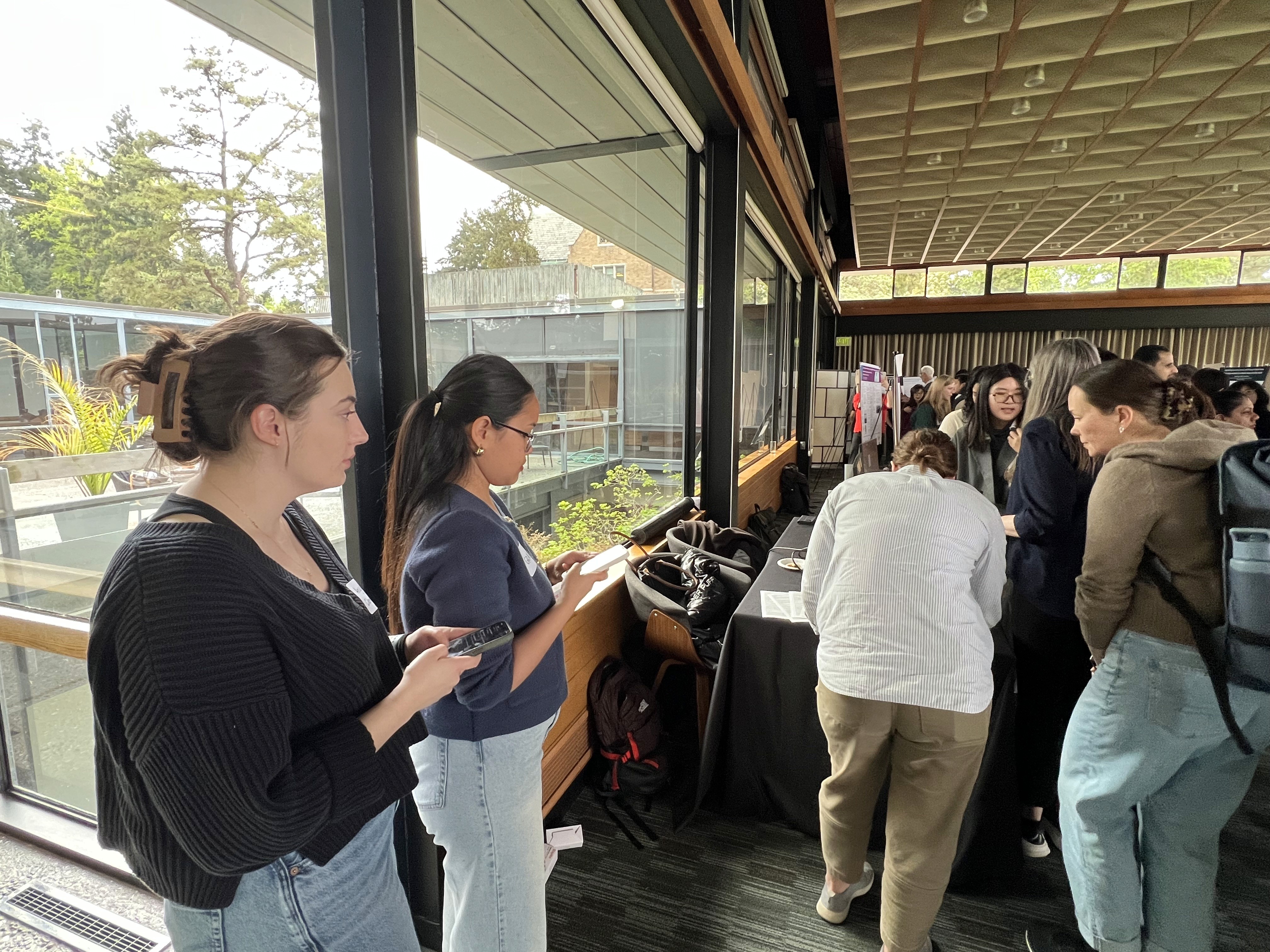
2 field observations of coordinators managing approx. 100-250 guests

9 interviews with various types of event coordinators
Findings
Event coordinators experience cognitive overload when unstable information, time pressure, social expectations, and environmental constraints make it hard to keep people, decisions, and resources aligned in real time.
Time Pressure
Time pressure compresses coordinators' ability to process and act — 9/9 faced an urgent, immediate communication at some point during an event, which reshapes which channel they reach for.
Communication Tools
Communication tools are the make-or-break factor — 8/9 said their tools caused misalignment (e.g. a walkie is fast but unclear in a loud room).
Multi-Role
Multi-role management demands constant social adaptability — 7/9 said they adjust tone depending on who they're talking to, and that shift can read as coldness under pressure.
Event Environment
Event environment disrupts information flow — 6/9 cited availability conflicts (bad signal, noise, venue size) delaying problem-solving.
"I wouldn't adjust how I communicate […] it's just we need a better tool to do it." -P03
Process
We started by solving the wrong problem
Our first concept was voice capture: push-to-talk on a wearable, with the system reading back what it heard so the coordinator knew it landed. Everyone on the event team would carry one. It fit the brief we were given, an AI voice tool, and the image of someone whose hands are always full.

Concept 1: voice capture for everyone on the event. Cut after the pivot.
A guest critic named the fatal flaw. Our concept required everyone working the event to adopt new software: vendors, staff, contractors, the venue. That was never going to happen. He offered no alternative, so the way forward was ours to find.
Looking harder at the concept, I argued the delivery model was not its only problem. We had drifted into task management when tasks were never the core issue, and the answer was sitting in research we had already done. Going back to it, we reached the diagnosis ourselves: coordinators could already send a message any number of ways. What they could not do was track what happened after.
Capture was never the problem. Tracking was.
The pivot: one record, not one more channel
So we started designing a place where everything already sent could live. Each situation has its own record, its source, and a live account of what is happening, who is involved, and who has answered.

Before: Information coming in through multiple channels, no clear place to go.

After: the same situation as one record carrying source badges, with a status.
We also narrowed who would hold it, which answered the adoption flaw directly. Coordinators were always who we designed for, but the first concept put a device in everyone's hands. Adoption is far easier when one person can start using a tool than when an entire team has to adopt it at once.
Coordinators had told us they wouldn't change how they communicate, only that they needed a better tool — and the same holds for everyone they work with. So Hiya Hub asks nothing of anyone else. Vendors, staff, and clients keep texting, calling, and emailing exactly as they do now.

Concept 1: voice capture for everyone on the event. Cut after the pivot.
Designing for judgment, not automation
Consolidating the channels only helped if the coordinator stayed in control of them. We wrote three rules the product has to obey, and built every screen against them.


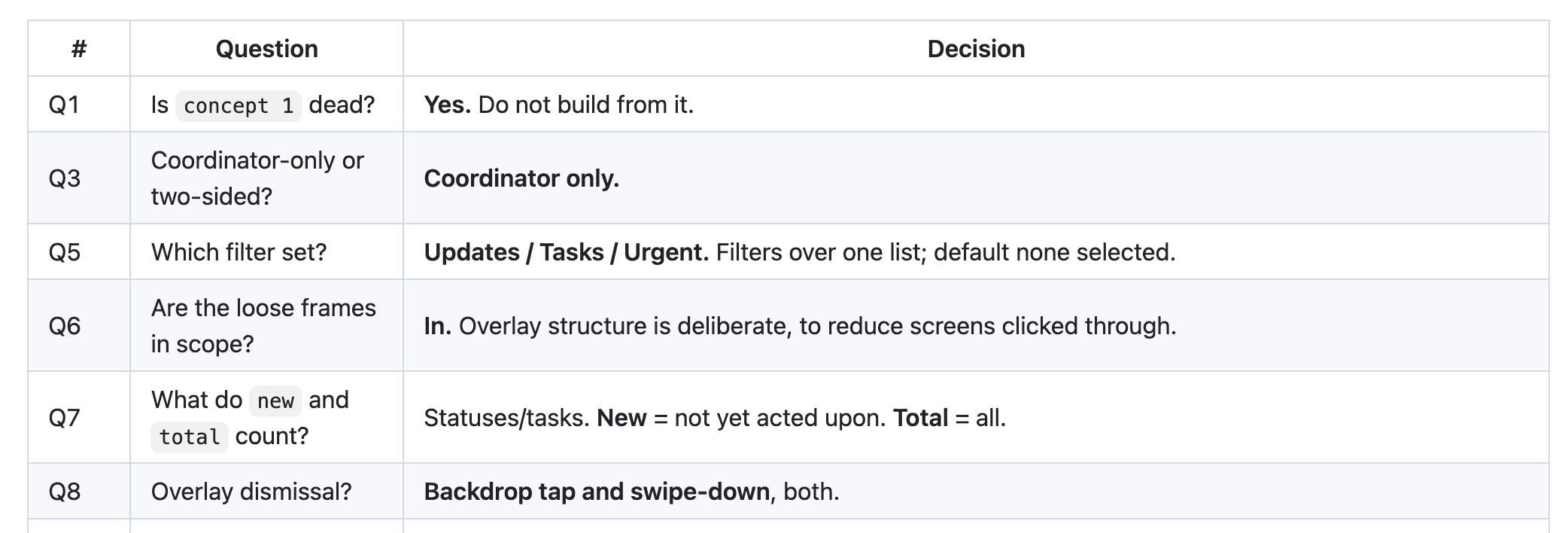
Choices made with a coding bot, written down so the team could find them again.
Testing + Takeaways
Evaluative Testing
We tested with four working event coordinators, each with more than a decade in the field. Each got a staff list and two live scenarios, and was asked how they would respond using Hiya Hub.
Sessions were remote. They liked re-routing, but who the second or third person should be could not be judged: coordinators know those people by instinct, and we handed them strangers.
P01
2,500 guests
P02
800 guests
P03
20,000 guests
P04

Coordinators engaged with the prototype using verbal directions. Sessions were remote.
"It's much faster than having to go back to the address book, find the other person and call them." — Event coordinator, 17 years experience
"One app where I could call, text message, forward messages… in one place is a lot easier than having to toggle back and forth. It saves seconds, and those seconds really matter, particularly when you're multitasking." — Event coordinator, 10+ years experience
One pass at the end of a project cannot validate a design, and we had no room to iterate on what came back. What it could do was show where the product sat between a coordinator and their work. Three things came back clearly
Onboarding is the gap
Coordinators had to learn the model before they could use it. Then it read clearly.
Seconds are the unit
Coordinators measure the product in seconds saved.
Reaching the next person is the job
Call and forwarding both have to be immediate. Neither can sit behind a menu.
Final Product
Status Dashboard
Every situation becomes a card carrying its source, its age, and its status, so the coordinator reads one surface instead of switching between apps.
Status Log
Status Detail opens one situation. The Status Log is the full history of what was tried.
Situation Thread
The thread holds the messages and any suggested next step. The coordinator sends the reply from here.
AI Suggested Next Contact
Coordinators already have point people for each area. When the first doesn't answer, the flow proposes the next one, so the task moves instead of waiting on someone unreachable.
Suggested Reply
The AI proposes a next action and drafts the message that goes with it. The coordinator edits, overrides, or sends. Nothing leaves on its own.
Reflection
Every problem this project ran into was about asking too much of people, not about the screens. V1 asked an entire event to adopt new software. The final version asks one person — and testing showed we still asked that person to learn the model alone. I now design for what a product demands of people, not only for what it does.
Next Steps
Design onboarding
Build the first-contact experience testing identified as the critical missing piece
Bring in the core internal team
Extend past the coordinator to the internal team the product always intended to include.
Retest with onboarding and their own team
Run a second round where coordinators work a roster they actually know.